
Modals
Modals display dialog windows in front of the Shopware Administration interface.
They should be triggered by user interaction and used for confirmations, forms, or multi-step workflows. To return to the main content the user must engage with the modal by completing an action or by closing it.
Avoid opening modals automatically without context, as this interrupts the user’s workflow. For example, it is poor practice to show modals immediately after login (such as changelogs) that users must manually dismiss.
See also: Base Options for shared configuration options supported by SDK message APIs.
import { notification, ui } from "@shopware-ag/meteor-admin-sdk";modal.open()
Open a new modal in the current view. The content of the modal is determined by your locationId or by using plain text with textContent.
Usage
ui.modal.open({
  title: "Your modal title",
  // Use locationId for rendering custom content inside modal
  locationId: "your-location-id",
  // Use textContent when no locationId is needed
  textContent: "Do you really want to dispatch a notification?",
  variant: "large",
  showHeader: true,
  showFooter: false,
  closable: true,
  buttons: [
    {
      label: "Dispatch notification",
      method: () => {
        notification.dispatch({
          message: "Hello from the modal",
          title: "Modal example",
        });
      },
    },
    {
      label: "Close modal",
      variant: "primary",
      method: () => {
        ui.modal.close({
          locationId: "your-location-id",
        });
      },
    },
  ],
});
Parameters
| Name | Required | Default | Description | Available at Shopware |
|---|---|---|---|---|
title | true | The title of the modal | ||
locationId | false | The id for the content of the modal. If not provided it will render the textContent | ||
textContent | false | The plain text content of the modal. Will only be rendered if no locationId is given | v.6.7.1 | |
variant | false | 'default' | Determine the size of the modal. Possible values are 'default', 'small', 'large' and 'full' | |
showHeader | false | true | Enable the header in the modal which contains the title | |
showFooter | false | true | Enable the modal footer | v6.5.8 |
closable | false | true | If this is set to false then the modal can only be closed programmatically | |
buttons | false | [] | This array contains button configurations which will render buttons in the footer of the modal |
Example
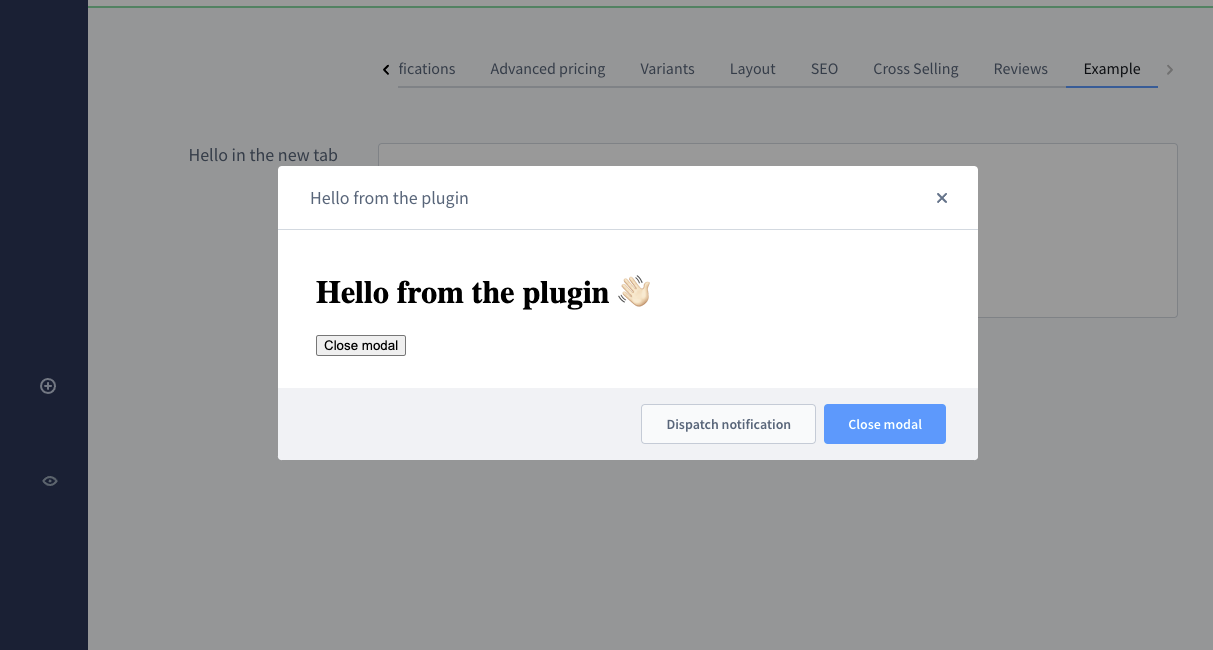
ui.modal.open({
  title: "Hello from the plugin",
  locationId: "my-awesome-app-hello-world-modal",
  buttons: [
    {
      label: "Dispatch notification",
      method: () => {
        notification.dispatch({
          message: "Hello from the modal",
          title: "Modal plugin",
        });
      },
    },
    {
      label: "Close modal",
      variant: "primary",
      method: () => {
        ui.modal.close({
          locationId: "my-awesome-app-hello-world-modal",
        });
      },
    },
  ],
});
Return value
Returns a promise without data.
modal.update()
Available since Shopware 6.7.1.0
Updates an existing modal with the given locationId. This can be used to modify the modal's properties after it has been opened, such as changing the title, buttons, or visibility of header/footer from inside the modal.
Usage
ui.modal.update({
  locationId: "your-location-id",
  title: "Updated modal title",
  showHeader: true,
  showFooter: true,
  closable: true,
  buttons: [
    {
      label: "New button",
      method: () => {
        // Your method here
      },
    },
  ],
});
Parameters
| Name | Required | Default | Description |
|---|---|---|---|
locationId | true | The id of the modal which should be updated | |
title | false | The new title of the modal | |
showHeader | false | Enable or disable the header in the modal | |
showFooter | false | Enable or disable the modal footer | |
closable | false | If set to false then the modal can only be closed programmatically | |
buttons | false | Array of button configurations which will render buttons in the footer of the modal |
Return value
Returns a promise without data.
modal.close()
Closes an opened modal. You need use the correct locationId of the modal which should get closed. If you don't provide a locationId the last modal without a locationId gets closed.
Usage
ui.modal.close({ locationId: "your-location-id" });Parameters
| Name | Required | Default | Description |
|---|---|---|---|
locationId | false | The locationId of the modal which should get closed. If not provided, the last modal without a locationId will be closed. |
Return value
Returns a promise without data.
