
Configuration
Feature flag
The MCP server is gated behind the MCP_SERVER feature flag. Add it to your .env file:
MCP_SERVER=1When inactive, all MCP services are removed from the container at compile time with no runtime overhead.
Shopware MCP configuration
Shopware-specific MCP settings live under the shopware.mcp key in config/packages/shopware.yaml or any config file loaded in your application:
shopware:
    mcp:
        allowed_tools: []       # Empty = all tools allowed. List tool names to restrict globally.
        app_tool_timeout: 10    # Timeout in seconds for app webhook tool calls.
Global tool allowlist
allowed_tools is an installation-wide safety switch. It restricts which tools are available across all integrations at compile time:
shopware:
    mcp:
        allowed_tools:
            - shopware-entity-schema
            - shopware-entity-search
            - shopware-system-config-read
An empty list (the default) means no compile-time restriction; all registered tools are available. The per-integration and per-user allowlists in the Admin UI are the primary controls for day-to-day access management.
Per-principal allowlist
Shopware applies a per-principal MCP allowlist depending on how the client authenticates:
| Auth mode | Allowlist source |
|---|---|
Integration access key (SWIA...) | Per-integration allowlist under Settings → Integrations → Edit MCP Allowlist |
User access key (SWUA...) | Per-user allowlist under Settings → Users & Permissions → [user] → MCP Tool Allowlist |
| Bearer JWT, password / refresh grant | Per-user allowlist of the authenticated user |
| Bearer JWT, client_credentials | Per-integration allowlist |
Integration + sw-app-user-id (Copilot) | Intersection of the integration allowlist and the user allowlist |
null per key means all capabilities of that type are allowed; a JSON array restricts to the listed names; an empty array [] means no capabilities of that type are accessible.
Admin user accounts (admin = true) always bypass the allowlist regardless of auth mode. This applies to user accounts, not to integrations created with --admin (which bypasses ACL but still respects the per-integration allowlist).
Delegated user calls (sw-app-user-id)
Apps that act on behalf of a logged-in user (for example, a Copilot sidebar embedded in the Admin UI) can pass the sw-app-user-id header alongside integration credentials:
sw-access-key: SWIA...
sw-secret-access-key: ...
sw-app-user-id: <user-uuid>
The value must be the Shopware user ID (a UUID in hex format, e.g., 01932f3a...). Apps embedded in the Admin UI can read it from:
- The current session in JavaScript:
Shopware.Store.get('session').currentUser.id - The Admin API:
GET /api/_info/me— thedata.idfield in the response
If the header is absent or invalid (i.e., not a valid UUID), Shopware ignores it and applies only the integration allowlist.
When this header is present, and a valid user UUID is provided, Shopware applies the intersection of the integration allowlist and the user allowlist. A tool is only available if both the integration and the user have it enabled:
| Integration allowlist | User allowlist | Effective allowlist |
|---|---|---|
null (unrestricted) | null (unrestricted) | unrestricted |
null | [tool-b] | [tool-b] |
[tool-a, tool-b] | null | [tool-a, tool-b] |
[tool-a, tool-b] | [tool-b, tool-c] | [tool-b] |
[tool-a] | [] | [] (nothing) |
Admin users bypass the user side of the intersection — if the user is an admin, their allowlist is treated as null (unrestricted), so the integration allowlist alone applies.
This pattern lets the app owner control which tools the integration may ever call, while users control which of those tools they personally allow the app to use on their behalf. Neither side can grant more than what the other has permitted.
MCP bundle configuration
The underlying symfony/mcp-bundle is configured in config/packages/mcp.php. Shopware ships this file, and Symfony loads it automatically; the MCP_SERVER feature flag only gates the HTTP endpoint (/api/_mcp), not the bundle's DI configuration. You do not need to create or modify it for standard setups.
Session store
MCP sessions track an ongoing conversation across multiple requests. The client performs an initialize handshake first, then sends subsequent tools/call requests referencing that session ID. Session data must survive between requests.
Shopware defaults to a file-based session store that writes to %kernel.cache_dir%/mcp-sessions/.
| Store | Multi-worker | Multi-server | Backend |
|---|---|---|---|
file (default) | No | No | %kernel.cache_dir%/mcp-sessions/ |
memory | No | No | Per-process RAM |
cache (avoid) | No in dev | No | cache.app (ArrayAdapter in dev) |
framework (unusable in Shopware) | Yes | Yes | Requires active PHP session, not available because the Admin API is stateless |
| Custom Redis store (recommended for production) | Yes | Yes | Redis / Valkey |
Production: Redis session store
The file store works on a single machine. In a multi-server or Kubernetes environment, initialize and subsequent tool calls may land on different workers that do not share a local filesystem. Switch to Redis:
config/services.yaml:
services:
    mcp.session.cache_psr16:
        class: Symfony\Component\Cache\Psr16Cache
        arguments: ['@cache.mcp_sessions']

    mcp.session.store:
        class: Mcp\Server\Session\Psr16SessionStore
        arguments:
            - '@mcp.session.cache_psr16'
- 3600 # TTL in secondsconfig/packages/framework.yaml:
framework:
    cache:
        pools:
            cache.mcp_sessions:
                adapter: cache.adapter.redis_tag_aware
                provider: 'redis://your-redis-host:6379'
                default_lifetime: 3600
If you already have a Redis/Valkey connection configured for Shopware, set provider to the same DSN to avoid opening a second connection.
ACL and permissions
All MCP tool operations respect the integration's Admin API ACL role. To restrict what an MCP client can do:
- Create an ACL role in Settings → Users & Permissions → Roles with only the required permissions.
- Assign that role to the integration (omit
--adminwhen creating via CLI). - Under Settings → Integrations → Edit MCP Allowlist, enable only the tools needed for this integration.
The Admin UI surfaces two helpers for getting ACL right:
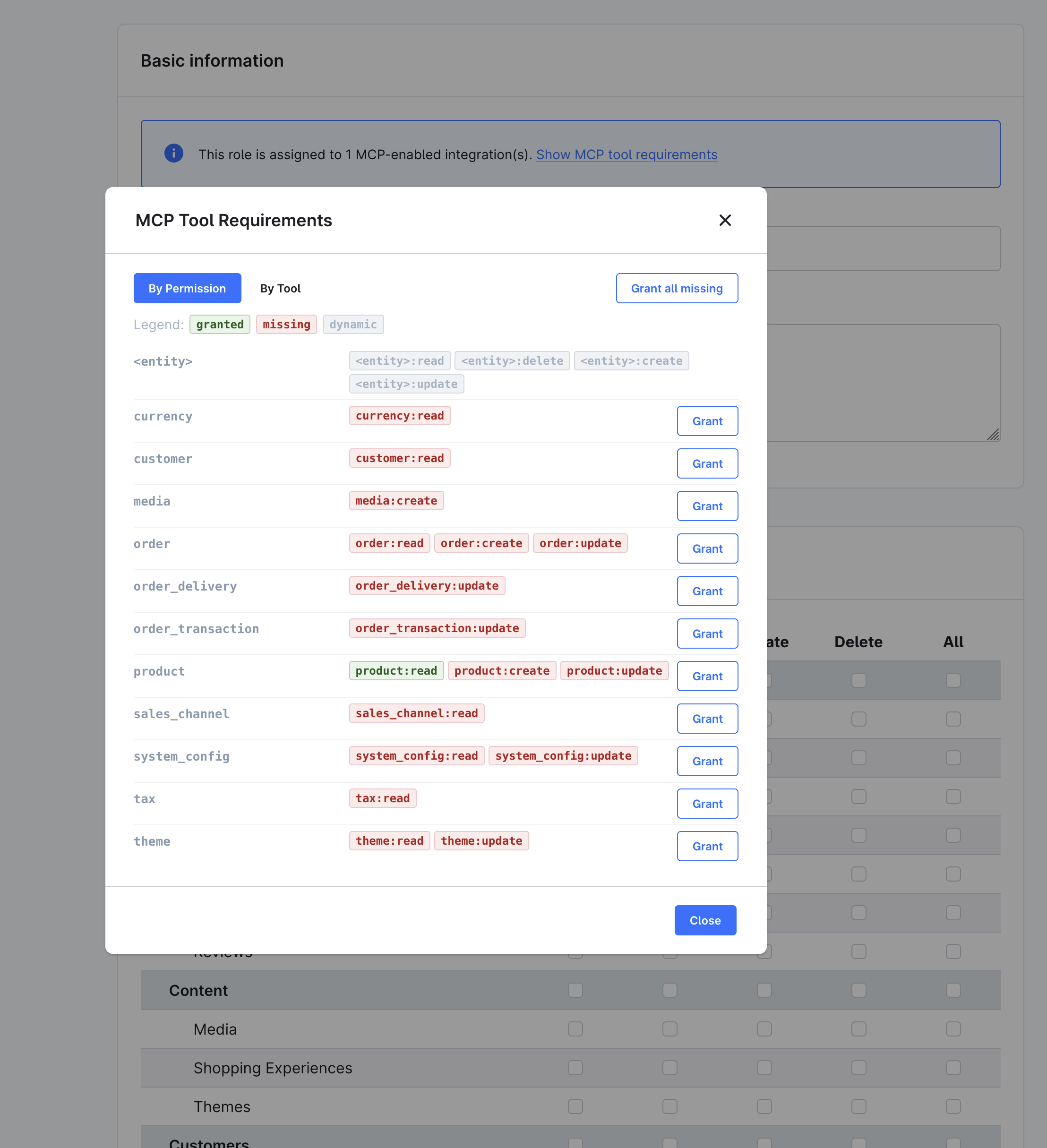
- The Role detail page shows a banner when the role is assigned to MCP-enabled integrations. Click Show MCP tool requirements to open the MCP Tool Requirements modal, which lists every privilege required by the allowed tools. Switch between By Permission (per-entity view with Grant buttons) and By Tool (per-tool view). Use Grant all missing to add the missing privileges in one click:
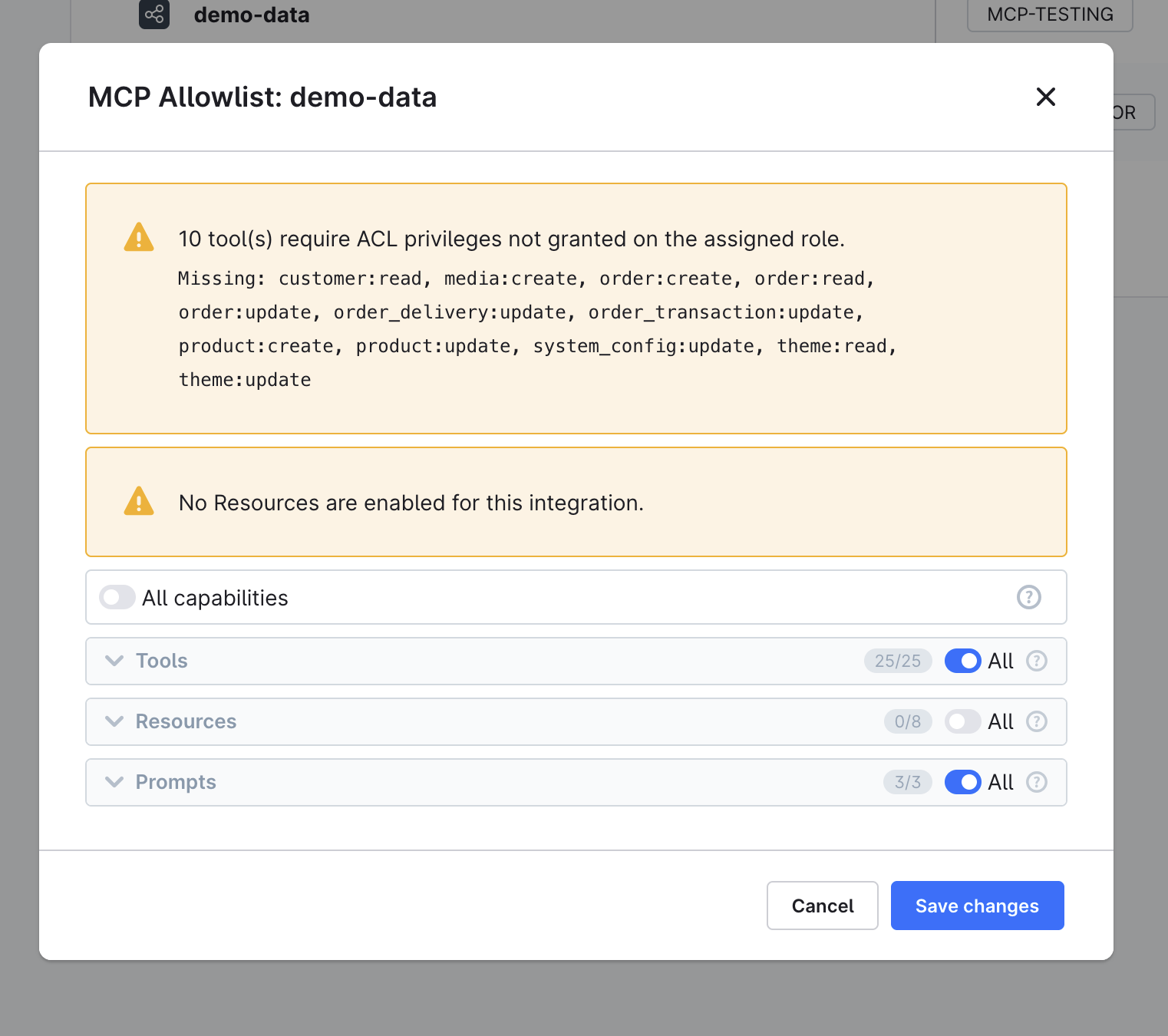
- The Edit MCP Allowlist modal shows a coverage warning when the assigned role is missing privileges required by an allowed tool:
CLI: debug:mcp
List all registered capabilities:
bin/console debug:mcpThe output shows four columns: Name, Source, Dependencies, and Privileges. It reads from the live server registry and covers core tools, plugin tools, and app tools in one view.
Filter by capability type:
bin/console debug:mcp --tools      # tools only
bin/console debug:mcp --prompts    # prompts only
bin/console debug:mcp --resources  # resources only
Drill into a single capability by name:
bin/console debug:mcp shopware-entity-searchSee the registry from a specific integration's perspective (honors its per-integration allowlist):
bin/console debug:mcp --integration=SWIA...If a tool is missing from this output, it is also missing from the live endpoint. Common causes:
- Plugin is not installed or activated
- Service tag is missing (
shopware.mcp.tool) #[McpTool]attribute is on__invoke()instead of the class- App tool's webhook URL is not reachable
Rate limiting
The MCP endpoint applies per-integration rate limiting. Each set of credentials gets its own rate limit bucket. Rate limiting protects the endpoint from brute-force attempts and runaway agent loops.
